Single PC
$149
1 computer
- Unlimited scanning and fixing
- Full reports and undo journal
- 12 months from activation
- Move it between computers

Find and fix the file and folder names Egnyte won’t accept — before you migrate, not after the transfer fails.
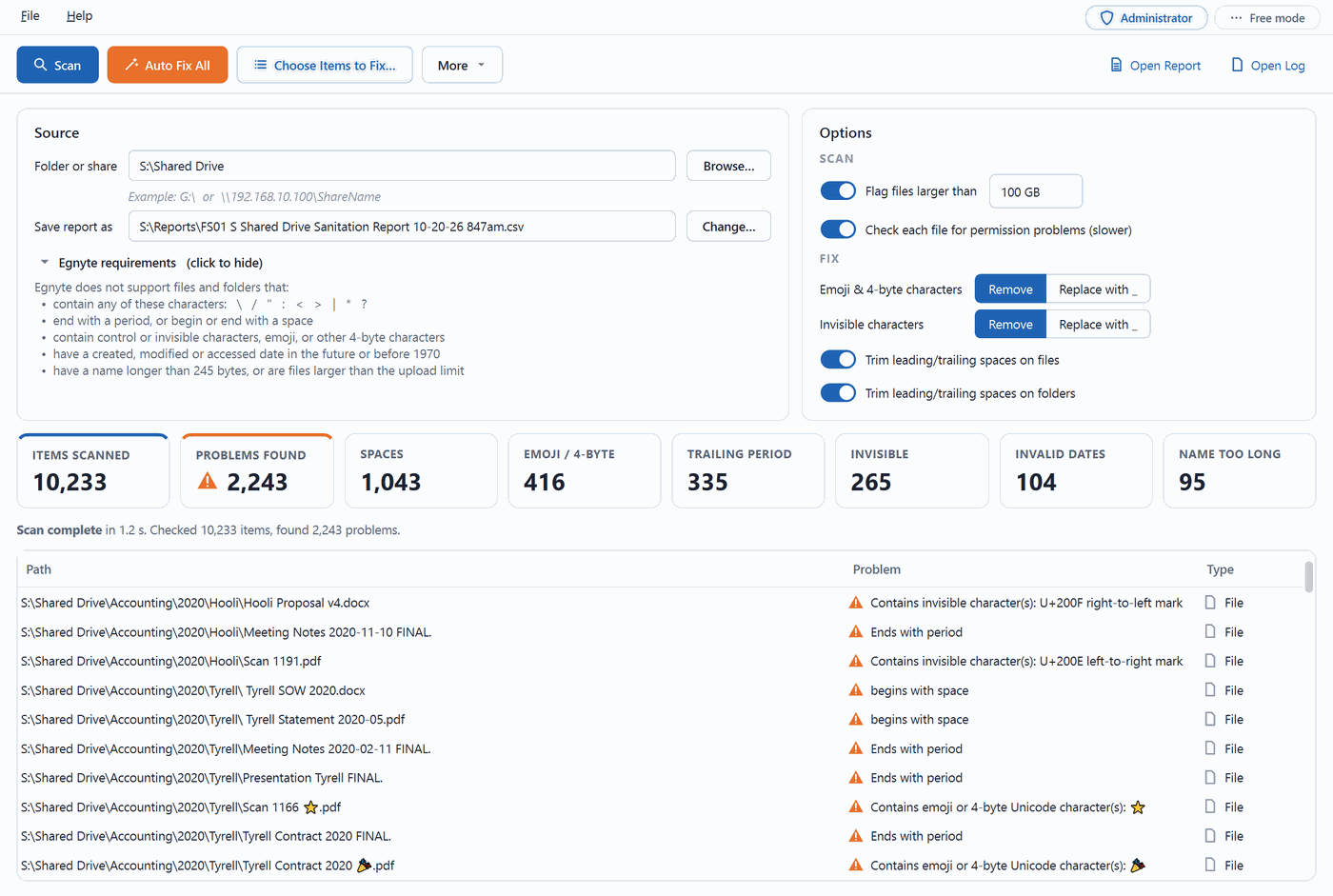
Egnyte will not accept every file name Windows, macOS and Linux allow. Names containing the characters it reserves, names that end in a period or begin or end with a space, emoji and other 4-byte characters, invisible characters pasted in from web pages and documents, names longer than 245 bytes, dates set in the future or before 1970, files over the upload limit — all of them fail to come across.
On a share with tens of thousands of files there can be thousands of them, scattered through every department’s folders. Finding them by hand is slow, and some cannot be fixed by hand at all: names created by Macs or by Linux-based NAS boxes, ending in a period or containing a colon, often can’t even be renamed from Windows Explorer.
MikeGration Sanitizer finds every problem item on a share in seconds, explains exactly what is wrong with each one, and fixes them automatically — with an undo journal, so the migration goes through cleanly the first time.
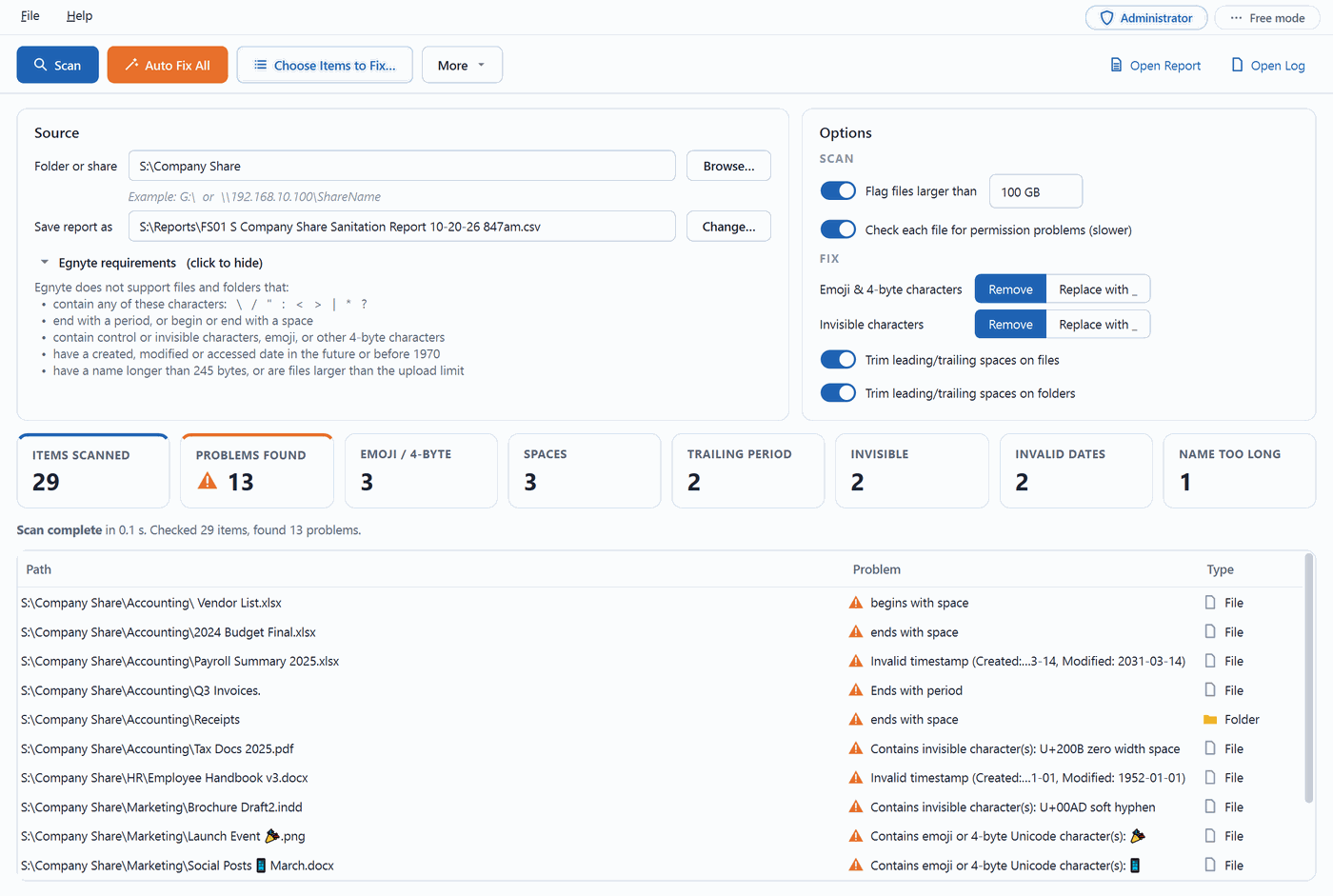
Point it at a local folder, a mapped drive, or a network share by its UNC path. It checks every file and folder against Egnyte’s naming rules, totals the problems by type, and lists each one with a plain-English reason. A CSV report is saved, named after the server and share.
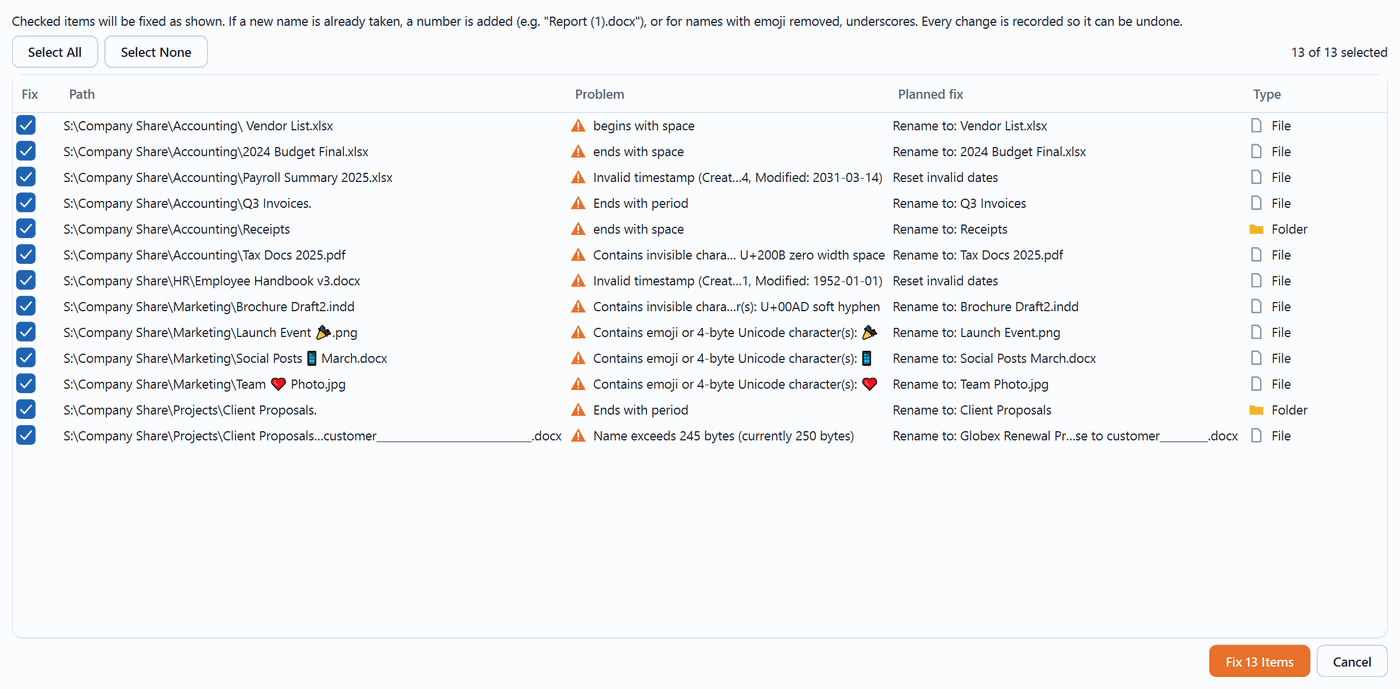
Choose Items to Fix shows the planned new name for every item before anything changes. Untick anything you want left alone. Or use Auto Fix All and let it work through the whole list.
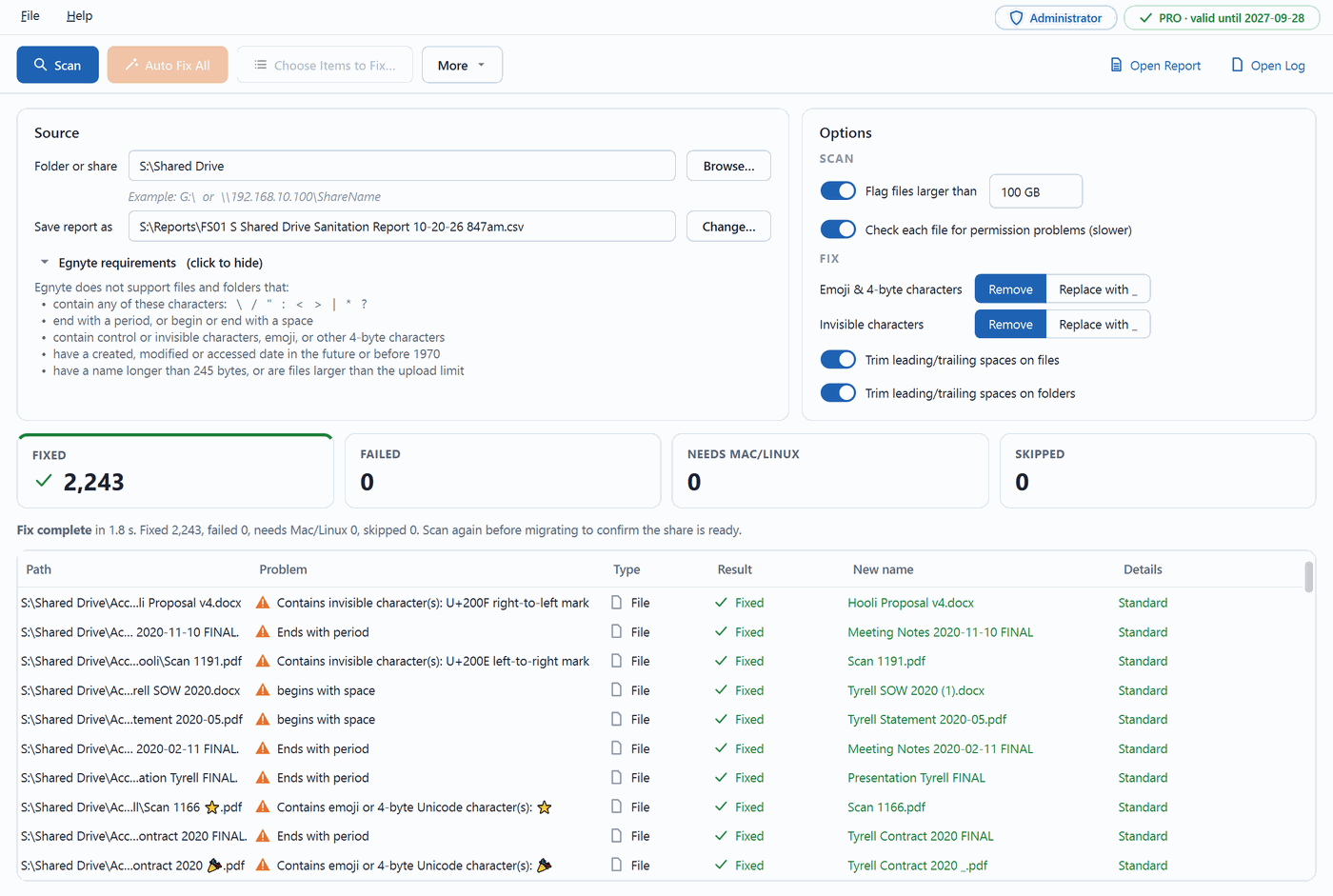
Bad characters are removed or replaced, spaces and trailing periods trimmed, long names shortened, invalid dates reset. Name clashes are avoided automatically. Every change is written to an undo journal, and Undo Last Fix reverses it. A CSV fix report records the old name, new name, result and method for every item.
Unsupported characters, leading and trailing spaces, trailing periods, control and invisible characters, emoji and other 4-byte characters, names over 245 bytes, invalid created, modified and accessed dates, and optionally files over a size limit — 100 GB by default.
Several rename methods are tried in turn for names normal Windows tools refuse. Anything Windows still cannot rename is marked “Needs Mac/Linux” and can be finished by running the macOS or Linux build against the same share.
The scan lists folders it could not read. On Windows, Fix Access Denied Items takes ownership and grants Administrators access. The app runs with backup privileges, so it can read and rename where folder permissions would normally block it.
Remove emoji and invisible characters, or replace them with an underscore. Separate switches for trimming spaces on files and on folders, and a size threshold you set. Clashing names become “Report (1).docx” rather than overwriting anything.
A CSV scan report named after the server and share, plus a log. After fixing, a second CSV records every item changed, how, and whether it worked — evidence for the migration record.
Scanning and fixing happen entirely on your computer. File names, paths, reports and logs are never uploaded. The app only goes online to check its license.
Scan as many shares as you like, as often as you like, at no cost. The free report and log list the first 100 problems, with totals for all of them. Fixing, the full report and the planned-fix column need a license.
| Platform | Download | Notes |
|---|---|---|
| Windows 10 / 11, 64-bit | Installer | Asks for administrator rights at startup — recommended on file servers. |
| macOS 11 or later, Apple Silicon | Disk image | Drag to Applications. Unsigned for now: the first open needs System Settings › Privacy & Security › Open Anyway. |
| Linux x86-64, Ubuntu 22.04 or newer | AppImage | Mark it executable, then run. Needs FUSE, which on Ubuntu 24.04 and newer means installing libfuse2t64. |
One license covers any mix of these systems, up to your tier’s computer count.
One-time purchase — no subscription and no auto-renewal. A license works for 12 months from its first activation, not from the day you buy it. Prices in USD; sales tax or VAT is added at checkout where required.
$149
1 computer
Most popular
$499
Up to 15 computers
$1,499
Up to 100 computers
100+
Talk to us
Fetching your key…
To activate: open MikeGration Sanitizer, go to Help › License, paste the key and click Activate. The same key has been emailed to you from licenses@srqcomputerservices.com.
Payments are handled by Paddle, who act as the merchant of record and appear as the seller on your invoice. See our Refund Policy and Terms of Service.
Scanning is free and unlimited. You see every total and the full on-screen problem list. The saved report and log list the first 100 problems, with totals for all of them. Fixing, the complete report and the planned-fix column need a license.
No. It is a one-time purchase, and the license runs for 12 months from the day you first activate it — not from the day you buy. Nothing auto-renews and nothing is charged again.
Yes. Deactivate it on the old computer and activate it on the new one. Your tier’s computer count is how many may be active at once, not how many you may ever install on.
Offline activation uses a license file tied to that computer’s Machine ID, which the app shows under Help › License. Email that Machine ID and your license key to info@SRQComputerServices.com and we will send the file back.
The macOS build is not signed yet. Open System Settings › Privacy & Security, scroll to the message about MikeGration Sanitizer and click Open Anyway. You only need to do this once. A signed build is coming.
Scan first — that part is free, and it tells you exactly what the tool would do on your share before you spend anything. If you do buy and it isn’t right, email us within 14 days for a full refund. See the Refund Policy.
We run these migrations ourselves. If you would rather someone else did the clean-up and the cutover, get in touch.
MikeGration Sanitizer for Egnyte is a product of SRQ Computer Services. It is not affiliated with, endorsed by, or sponsored by Egnyte, Inc. “Egnyte” is a trademark of its respective owner, used here only to describe what this software is compatible with.